Salary Calculator: Calculate Your Remaining After Tax – Free 2026

Salary Calculator: Work Out Your Take-Home Pay After Tax

Understanding your salary breakdown is crucial for financial planning. It helps you manage your money better.

Gross pay and net pay are two key terms you should know. Gross pay is your total earnings before deductions.

Trying to conceive? Once you’ve found your fertile window, use our Pregnancy Due Date Calculator to estimate your baby’s arrival date.
For a healthy journey, also try our BMI Calculator, Calorie Calculator, and Ideal Weight Calculator.

Salary Calculator

Convert your pay between hourly, daily, weekly, bi-weekly, monthly and yearly β€” with holiday & vacation adjustments β€” then estimate your take-home pay after tax and model a pay raise.

πŸ” Pay converterπŸ–οΈ Adjusted payπŸ’Έ Take-homeπŸ“ˆ Raise🌍 Multi-currency

Your pay

Disclaimer: Tax results are simplified estimates for the stated tax year and consider income tax only β€” they exclude items such as social security, national insurance, provincial/state taxes, surcharges, allowances and personal reliefs. This is not financial or tax advice; confirm figures with your employer or a qualified tax professional.
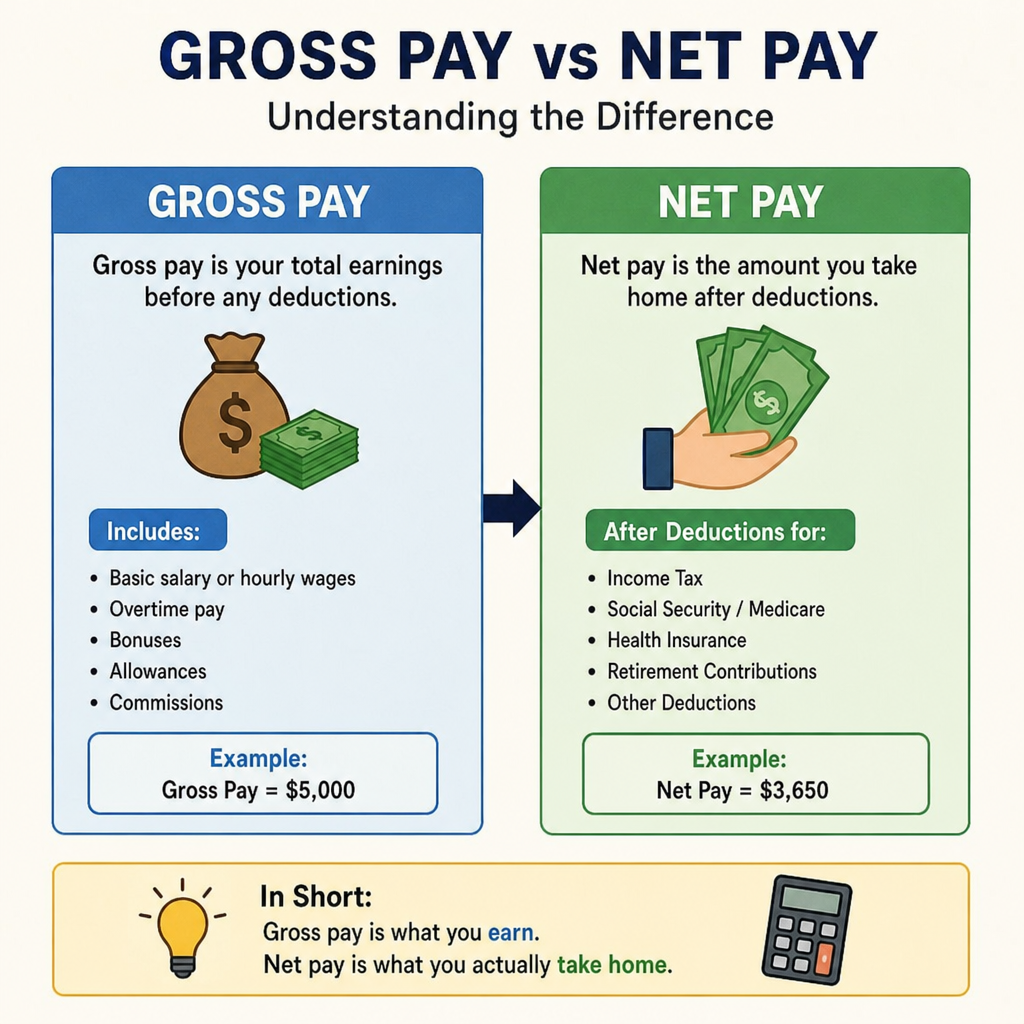
Net pay, often called take-home pay, is what you actually receive. It’s the amount after taxes and other deductions.

Knowing the difference between gross vs net pay is essential. It affects your budgeting and financial decisions.

A salary calculator can simplify this process. It helps you estimate your take-home pay after taxes.

This guide will walk you through calculating your salary net pay. You’ll learn about deductions and how to maximize your take-home pay.

What Is Gross Pay vs Net Pay?

The terms gross pay and net pay are often confused. But they mean different things in your paycheck. Understanding both is key to managing your finances.

Gross pay is your total earnings before any deductions. It includes your base salary and any other payments. Overtime, bonuses, and allowances add to gross pay.

Net pay, however, is what you actually take home. This is your earnings after taxes and deductions. It’s the amount deposited into your bank account.

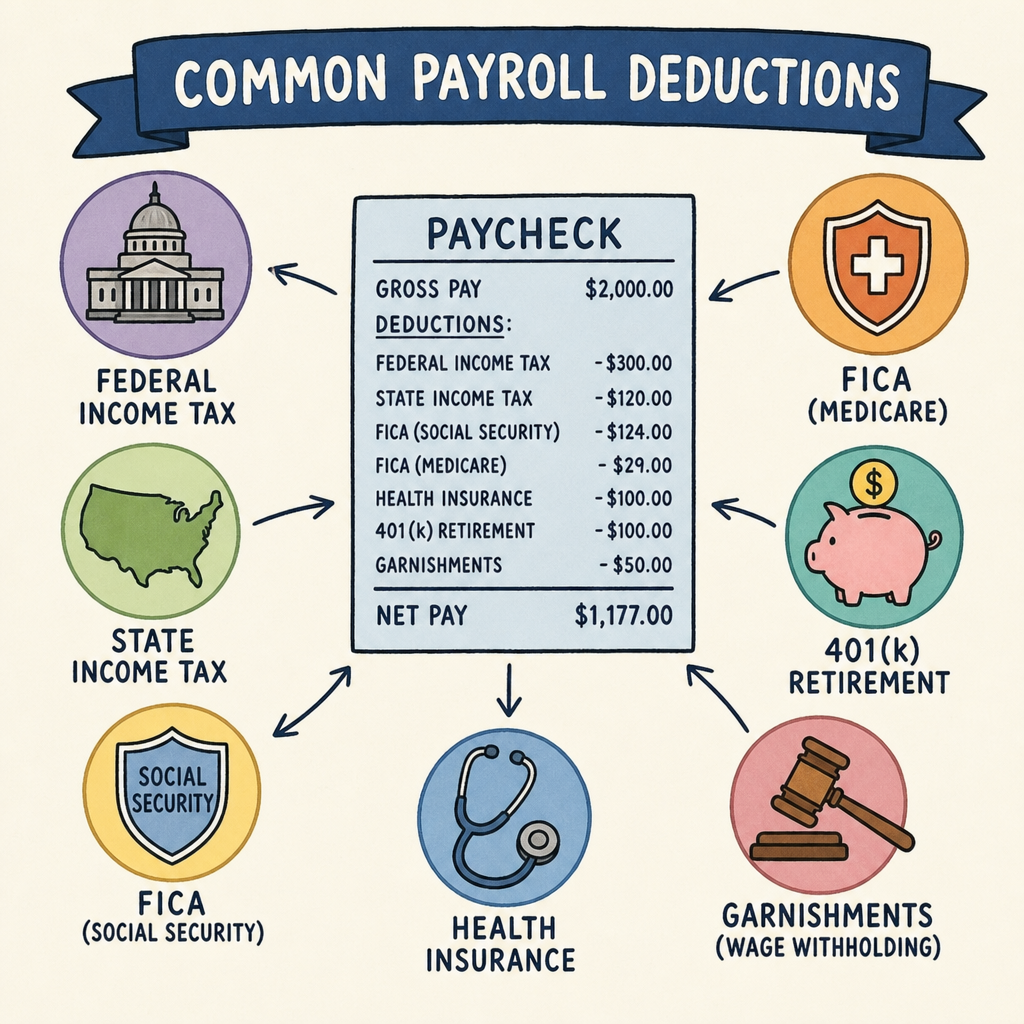
The deductions from gross pay to net pay can vary. Common deductions include federal and state taxes. Social Security, Medicare, and retirement contributions also reduce your pay.

Understanding the Salary Calculator terms helps with financial planning. Knowing what you earn and what you keep is vital.

Here’s a simple breakdown: Try Income Tax, Calculator

  • Gross Pay: Total earnings before deductions.
  • Net Pay: Earnings after taxes and deductions.
salary calculator
salary calculator

In summary, gross vs net pay understanding helps you track where your money goes. This knowledge aids in better financial decisions.

Why Understanding Salary Net Pay Matters

Understanding your salary net pay is crucial for many reasons. It directly impacts your ability to budget and save effectively. Knowing your take-home pay helps you plan your expenses.

Salary Calculator. Without knowing your net pay, budgeting becomes a guessing game. You might overspend and run into financial trouble.

There are several financial aspects dependent on your net pay. It influences your ability to:

  • Set and reach savings goals.
  • Manage and reduce debt.
  • Plan for large purchases or investments.

Being aware of your net pay aids in financial transparency. It helps avoid unexpected shortfalls in your monthly budget. You’ll be better equipped to handle financial emergencies.

Finally, understanding net pay allows for informed negotiations. You can more accurately gauge job offers and salary increases. This knowledge can lead to better employment decisions. In essence, net pay is not just a number β€” it’s the foundation of financial well-being.

Key Deductions That Affect Take Home Pay

Salary Calculator: Your take-home pay is influenced by several key deductions. These deductions reduce your gross salary to arrive at net pay.

Salary Calculator: Federal and state taxes are the most common deductions. The amount withheld varies based on income and location.

Salary Calculator: Social Security and Medicare are mandatory contributions. They fund essential government programs for retirees and health care.

Salary Calculator: Employer-sponsored retirement plans, like 401(k)s, also affect net pay. Contributions are often deducted pre-tax, reducing taxable income.

Salary Calculator: Health insurance premiums may be deducted from your paycheck. These deductions support health coverage for you and your family.

Salary Calculator. Other potential deductions include union dues and garnishments. Court orders or loan repayments can cause garnishments.

Here’s a list of common deductions affecting take-home pay:

  • Federal taxes
  • State taxes
  • Social Security and Medicare
  • Retirement contributions
  • Health insurance premiums
  • Union dues
  • Wage garnishments
salary calculator

It’s essential to understand each deduction’s impact. This knowledge helps you anticipate net pay accurately. Checking your pay stub regularly ensures correctness in applied deductions.

Keeping track of these deductions aids in financial planning. Understanding your take-home pay can lead to smarter budgeting choices. Accurate insight into deductions enhances your financial security.

How to Calculate Your Net Pay: Step-by-Step Guide

Calculating your net pay manually provides a clear picture of your earnings. Begin by knowing your gross pay, which is your total earnings before deductions.

Start by identifying all applicable deductions. This includes taxes, retirement contributions, health insurance, and any other withholdings.

Understand tax rates for federal and state taxes. You may need to check tax tables based on your income and filing status.

Next, calculate pre-tax deductions. These are subtracted from your gross pay before taxes are applied. Examples include retirement plan contributions.

Proceed by calculating taxable income. Subtract pre-tax deductions from gross pay to find this amount. Your taxes are then based on this figure.

Now, apply the appropriate tax rates. Federal and state income taxes depend on taxable income and location.

Continuing, subtract both Social Security and Medicare taxes. These are calculated at standard rates for most employees.

Finally, subtract post-tax deductions from what remains. Common post-tax deductions include union dues and garnishments.

Here’s a simple step-by-step list of this process:

  1. Start with gross pay.
  2. Subtract pre-tax deductions.
  3. Find taxable income.
  4. Deduct federal and state taxes.
  5. Deduct Social Security and Medicare.
  6. Subtract post-tax deductions.

After all calculations, the remaining amount is your net pay.

You can alternatively use online salary calculators. These tools simplify the process by automating calculations and considering current tax rates.

salary calculator

by Kelly Sikkema (https://unsplash.com/@kellysikkema)

An accurate understanding of net pay ensures better financial planning. It allows you to anticipate take-home pay accurately for budgeting. This knowledge empowers you to make informed decisions about savings and spending.

Using a Salary Calculator: Tools and Tips

A salary calculator is an efficient way to estimate net pay with accuracy. These tools simplify complex computations and save time. Many online calculators are available for free.

To begin, input your gross pay into the calculator. Ensure you include any bonuses or additional earnings in the gross pay.

Next, enter your personal details like filing status and state of residence. This information is crucial for accurate tax calculations.

Customizing the calculator settings can improve precision. Some calculators allow specific deductions like health insurance or 401(k) contributions to be added or removed.

Here’s a short list of tips to enhance your calculator usage:

  • Always update with the latest financial data.
  • Double-check all input entries for accuracy.
  • Use calculators from reputable sources.
salary calculator

by PiggyBank (https://unsplash.com/@piggybank)

Many calculators also offer projections for annual earnings. This helps plan future finances effectively.

By using these tools, you streamline the payroll process for yourself. Optimize your financial planning and avoid errors through accuracy and efficiency.

Common Mistakes When Calculating Take Home Pay

Calculating take-home pay might seem straightforward, but common pitfalls can lead to errors. These mistakes often stem from overlooked details.

Firstly, many people underestimate the impact of deductions. Failing to account for all possible deductions can yield an inaccurate net pay estimate.

Another frequent error is using outdated tax rates. Tax laws change regularly, affecting your net income. Always ensure you have the latest tax information.

Ignoring non-standard deductions such as union dues or garnishments can also skew calculations. These deductions may vary, so it’s vital to include them.

Here’s a concise list of typical missteps:

  • Not updating for new tax laws.
  • Overlooking variable deductions.
  • Failing to include bonuses or side income.

Being aware of these issues enhances accuracy. This helps avoid surprises and ensures your financial planning remains on track. Understanding these common mistakes can improve your confidence in managing your salary calculations.

How Bonuses, Overtime, and Benefits Impact Net Pay

Bonuses can significantly affect your net pay. They are often taxed at a higher rate, known as the supplemental rate. This means the extra earnings might not boost your take-home pay as much as you expect.

Overtime earnings add to your gross income, but they also lead to higher taxes. As your income increases, you may move into a higher tax bracket. It’s important to consider this when evaluating the impact of extra hours.

Benefits can also impact net pay in various ways. For instance, employer-sponsored health insurance premiums are often deducted before taxes. This lowers your taxable income, potentially resulting in tax savings.

Retirement contributions, like those to a 401(k), are another consideration. These contributions are usually pre-tax, meaning they reduce your gross taxable income.

Here’s a list of factors affecting net pay from bonuses, overtime, and benefits:

  • Higher tax rates on bonuses.
  • Overtime potentially pushing you into a higher tax bracket.
  • Pre-tax deductions for health insurance.
  • Retirement contributions reducing taxable income.

Understanding these components helps anticipate changes in take-home pay. With careful planning, you can maximize the benefits of extra earnings and contributions.

salary calculator

by Morgan Housel (https://unsplash.com/@morganhousel)

Comparing Job Offers: Gross vs Net Pay Considerations

When comparing job offers, it’s crucial to distinguish between gross and net pay. The gross salary might seem impressive, but net pay provides a clearer picture of your actual earnings.

Consider the various deductions that will impact your net pay. Tax rates, retirement contributions, and health insurance premiums are key factors to examine. These deductions can differ significantly among employers.

Make sure to evaluate the entire compensation package. Some employers may offer benefits that effectively increase your take-home pay. Consider perks like flexible spending accounts or employer matching for retirement contributions.

When evaluating job offers, keep this list in mind:

  • Compare both gross and net pay.
  • Analyze deductions for taxes, retirement, and insurance.
  • Consider additional benefits and perks.
  • Evaluate long-term financial impact.

By focusing on these aspects, you can make informed decisions when choosing the best job offer. Understanding net pay helps ensure your financial goals align with your new job.

Frequently Asked Questions About Salary Net Pay

What is the difference between gross pay and net pay?

Gross pay is your total earnings before any deductions. Net pay, often called take-home pay, is what you receive after taxes and deductions.

How is net pay calculated?

Net pay is calculated by subtracting deductions such as taxes, insurance, and retirement contributions from your gross salary. Each deduction varies depending on personal and work situations.

Why might my net pay differ each month?

Your net pay can fluctuate due to changes in tax withholdings, bonuses, or adjustments in your insurance premiums. Such changes can cause variations in your take-home pay.

Are all deductions mandatory?

No, not all deductions are mandatory. Some, like taxes, are required, while others like retirement savings, are voluntary. Choosing to contribute more can affect your take-home pay positively in the future.

Can I increase my net pay?

Increasing your net pay involves reducing voluntary deductions or boosting your income through negotiations or additional work. Understanding your pay stub can help identify potential adjustments.

Is it possible to estimate net pay accurately?

Yes, using a salary calculator can offer a precise estimate. Regularly updating inputs for any changes in your finances will help in maintaining accuracy. Here’s a list of things to keep in mind:

  • Regularly review and update deductions.
  • Use updated salary calculators for accuracy.
  • Understand all elements influencing your net pay.

This proactive approach ensures that you remain knowledgeable about your earnings and potential financial adjustments.

Tips to Maximize Your Take Home Pay

Maximizing your take-home pay requires a strategic approach. The first step is to review your current deductions. Some deductions, like certain insurance plans, might be optional, allowing you to adjust them as needed.

Increasing pre-tax contributions can also offer savings. By contributing more to retirement accounts, you lower your taxable income. This means less money goes to taxes, and more stays with you.

Regularly updating your withholding status is another key strategy. If your personal situation changes, like marriage or having a child, adjust your tax withholdings accordingly. This ensures you’re not over or under-withheld.

Here’s a concise list of tips to help maximize your income:

  • Adjust optional deductions.
  • Increase retirement contributions.
  • Update tax withholdings.
  • Take advantage of tax credits.
  • Review paycheck regularly for errors.

Additionally, always explore any available tax credits or deductions during tax season. These can reduce the amount of tax owed, increasing your net pay. Stay informed about any changes to tax laws that could impact you.

Conclusion: Take Control of Your Salary Net Pay

Understanding your salary net pay empowers you in financial decisions. Start by familiarizing yourself with the difference between gross and net pay. This distinction is critical for accurate budgeting and financial planning.

Regularly using a salary calculator can keep you informed about your deductions and net pay. By staying updated, you can make proactive financial decisions, ensuring that you make the most of your earnings. Understanding each deduction on your pay stub helps identify discrepancies before they affect your finances.

Knowledge of your take-home pay opens doors to making smarter choices about savings, investments, and spending. By taking control of your net pay, you can set achievable financial goals. Ultimately, this knowledge equips you to navigate financial challenges with confidence.

Salary Calculator β€” Frequently Asked Questions

1. What is a salary calculator?
A salary calculator is a free online tool that converts your pay between different time periods β€” hourly, daily, weekly, bi-weekly, monthly and yearly β€” and can estimate your take-home pay after tax. It lets you instantly see what a wage means across any pay frequency without doing the maths yourself.
2. How does a salary calculator work?
You enter your pay and how often you receive it, along with details like hours and days worked per week. The calculator then scales that figure to a full year and divides it back down into every pay period, so you can compare hourly, monthly and annual amounts side by side.
3. What is the difference between gross salary and net salary?
Gross salary is your total pay before anything is taken out. Net salary, also called take-home pay, is what actually reaches your bank account after income tax and other deductions. A good salary calculator shows both so you know your real spending power.
4. How do I convert an hourly wage to an annual salary?
Multiply your hourly rate by the hours you work each week, then by the number of weeks you work per year (commonly 52). For example, $25 per hour Γ— 40 hours Γ— 52 weeks equals $52,000 a year. A salary calculator does this automatically and can also subtract unpaid holidays.
5. How do I convert an annual salary to monthly, weekly or hourly pay?
Divide your annual salary by the right number: 12 for monthly, 52 for weekly, 26 for bi-weekly, or by your total yearly hours (often about 2,080) for an hourly figure. The calculator handles all of these conversions at once from a single entry.
6. How many working hours are there in a year?
A common standard is 2,080 hours per year, based on 40 hours per week across 52 weeks. The exact number depends on your contracted hours and how many paid holidays and vacation days you take, which is why most calculators let you adjust those inputs.
7. What do “unadjusted” and “holiday-adjusted” figures mean?
Unadjusted figures assume you are paid for every working day of the year. Adjusted figures account for unpaid holidays and vacation days, lowering the effective annual total. Comparing the two shows how time off affects your real earnings.
8. Does the salary calculator include tax?
Many salary calculators include an optional income-tax estimate so you can see your take-home pay, not just your gross. Because tax rules differ by country and personal situation, these figures are estimates and should be confirmed with your employer or tax authority.
9. How accurate is the take-home pay estimate?
It gives a close estimate using standard tax brackets, but your real net pay can differ. Things like personal allowances, social security, pension contributions, student loans and local taxes all affect the final amount, and these vary from person to person.
10. How is income tax calculated on a salary?
Most countries use progressive tax bands, where different slices of your income are taxed at increasing rates rather than one flat rate. The calculator applies each band in turn to your taxable income and adds the results to estimate your total tax.
11. What deductions reduce my net salary?
Common deductions include income tax, social security or national insurance, pension or retirement contributions, health insurance, and sometimes union dues or loan repayments. Each one lowers the gap between your gross and net pay.
12. What is a pay period or pay frequency?
A pay period is how often you are paid. Common frequencies are weekly, bi-weekly (every two weeks), semi-monthly (twice a month) and monthly. Your annual salary stays the same, but the size and number of paychecks changes with the frequency.
13. What is the difference between bi-weekly and semi-monthly pay?
Bi-weekly means every two weeks, giving 26 paychecks a year. Semi-monthly means twice a month, giving 24 paychecks a year. Bi-weekly cheques are slightly smaller because they are spread across more pay periods, even though the yearly total is the same.
14. How do holidays and vacation days affect my salary calculation?
If holidays and vacation are paid, they don’t change your annual salary. If they are unpaid, each day off reduces your effective yearly earnings. Salary calculators let you enter both so you can see the adjusted, more realistic figure.
15. Can I use a salary calculator for any country or currency?
Yes β€” a good salary calculator lets you choose your currency, and many include tax settings for several countries. For places not listed, you can usually enter your own tax rate to get an accurate take-home estimate anywhere in the world.
16. How do I calculate my new salary after a raise?
Multiply your current salary by one plus the raise percentage. For example, a 10% raise on $50,000 is $50,000 Γ— 1.10 = $55,000. You can then run the new figure through the salary calculator to see your updated monthly and take-home pay.
17. How much of my gross pay is usually taken out?
It varies widely by income level and country, but a meaningful share of gross pay typically goes to tax and mandatory contributions. The only reliable way to know your figure is to enter your details into a calculator and check it against your actual payslip.
18. What is the difference between a salaried and an hourly job?
Salaried employees receive a fixed annual amount regardless of exact hours, while hourly employees are paid for each hour worked and often earn overtime. A salary calculator helps you compare the two by converting an hourly rate into an equivalent annual salary.
19. How do I calculate overtime pay?
Overtime is usually paid at a higher rate, often 1.5 times your normal hourly wage. Multiply your hourly rate by 1.5, then by the number of overtime hours, and add it to your regular pay. Some roles and regions have different overtime rules, so check your local laws.
20. Is the salary calculator free, and is my information private?
Yes, the salary calculator is completely free to use. All calculations happen instantly in your browser, so the figures you enter aren’t sent anywhere or stored β€” your salary details stay private on your own device.
Scroll to Top