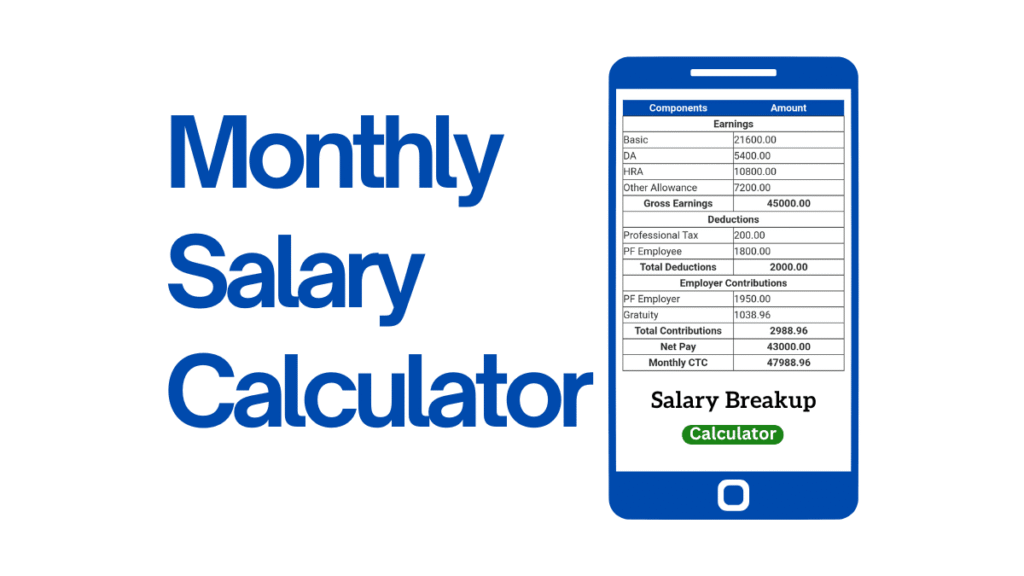
Take-Home Pay Calculator 2026 – Free Net Salary Calculator. The salary you earn on your contract is the gross pay, which is the amount that is before tax. The amount that is actually paid on your account represents your total, also called take-home pay. This calculator for take-home pay will show you the actual figure. Enter your annual gross income and the tax rate you pay and it immediately splits your net salary according to year, month and two-week intervals or week as well as per hour. Check our other calculators at: www.calcrange.com
Knowing your take-home earnings in these various categories makes budgeting much easier. Understanding your net monthly will tell the amount you’ll be spending on rent and other bills and knowing your hourly earnings will help you make the most of your time and also compare the job opportunities. Instead of guessing at what’s left after taxes, you’ll get an instant, clear breakdown.
Salary Calculator
Convert your pay between hourly, weekly, monthly and yearly — and estimate your income tax and take-home (net) pay. Pick your country (and state/province), then click Calculate.
⚠ Estimate only. Tax figures use standard individual income-tax brackets for the selected country (and an indicative flat rate for states/provinces). They exclude social security, national insurance, Zakat, surcharges, allowances, deductions and filing-status rules, so your actual tax will differ. This is not tax advice — confirm with your employer or tax authority (e.g. FBR, IRS, HMRC). Use the override field if you know your real effective rate.

How to Use This Take-Home Pay Calculator
The calculator requires two inputs. In the Annual Gross Salary in the first column, input your annual salary prior to any deductions or taxes. In the tax rate for total taxes ( percent), enter the percent that is a combination of your earnings to deduct taxes and other deductionssuch as 25 if around one-quarter of your income is devoted to tax. Click the Calculate Take-Home button and you’ll immediately be able to see your pay split into five different ways that include: monthly, annual or biweekly (every 2 weeks) weekly, hourly, based on a 40-hour week. Change the tax rate, and then recalculate the results to determine how the different levels of deduction alter the amount you can keep.
Gross Pay as compared to. Net Pay
Understanding the difference between net and net wages is the premise for personal financial planning. gross pay is the sum of your earnings before taking anything out. It’s the number that is mentioned in job ads as well as mortgage applications and used to determine the salary. Net pay is also known as take-home pay is what is actually paid to you after taxes and deductions are deducted. The most basic connection is:
Net Pay = Gross Pay – Taxes and Deductions
The difference between these two can be significant. When people receive their first pay check and are often shocked at how small the net amount is compared to the salary they signed up to. That’s precisely why knowing your take-home pay prior to the date of your paycheck is important. The best figure to use for daily living is net pay because it’s what you’re able to budget for bills, rent and savings.

How Take-Home Pay Is Calculated
This calculator follows a simple method: it adds the tax rate of your total to your gross income to calculate your net pay which is then divided by the net amount across regular pay times. The reasoning is:
- Net Annual Pay equals Gross pay minus (Gross salary * tax rate x 100)
- monthly = Net Annual / 12
- Biweekly = Net Annual / 26 (there are 26 two-week times during the year)
- Weekly = Net Annual / 52
- Hourly = Net annual 2,080 (based on 40 hours per week spread over 52 weeks)
For instance an annual gross salary of $75,000 with 25% tax total rate results in an annual salary of $56,250. It’s roughly $4,688 per month or $2,163 every two weeks, $1,082 per week or about $27 per hour. Looking at all the figures simultaneously allows you to organize on the basis of which pay cycle your employer follows.
What Makes Up Your Tax Rate
The one “total tax rate” you choose is a simplified representation of what’s typically a variety of distinct deductions. Depending on where you work, your pay can have income tax, social-security-style contributions, health or pension deductions, and local taxes withheld before you’re paid. Since these can vary from one person to another and from place to place and place to place, this calculator lets you use one rate instead of than trying to model each line. To find your true rate, take a review a pay slip from the past Divide your total deductions by the gross salary and then multiply it by 100. This will make the calculator’s estimates closely match the amount you actually receive.
Why Knowing Your Net Pay Matters
Your take-home salary is the amount that your life is based on. It reveals what you are able to be able to afford for the form of mortgage or rent or a loan, the amount you can put aside for savings and if a job offer actually is more lucrative once taxes are taken into account. A higher salary with higher deductions could result in an income that is that is taxed lessand only the net figure will reveal the difference. Knowing the amount before you commit to an expensive cost or agree to an arrangement can transform an unreliable salary figure in a number you could plot around with certainty.
A Note on Accuracy
This calculator offers a concise estimate of a tax rate. This makes it quick and simple to use. It’s not an substitute for a precise payroll calculation because real deductions depend on the tax bracket you’re in allowances, your filing status and local regulations that vary from person to location. Use the result as a valid planning figure instead of an exact pay stub and verify a current payslip or an expert to get exact figures to fulfill legal or tax purposes.
Take-Home Pay Calculator: Understanding What You Earn
There’s the number on a job offer and then there is what actually lands in bank accounts – these numbers rarely align, creating much quiet confusion as someone accepts a role expecting a certain amount every month only to find that on their payslip it looks drastically less. A take-home pay calculator exists to bridge this gap by turning a headline salary into real, spendable funds that allow a person to plan their life around it.
This guide details the differences between what an employer provides and what an employee keeps, how deductions operate, and how a good salary calculator makes this all happen within seconds. It is tailored towards anyone who has ever glanced over their payslip wondering where an amount has mysteriously vanished without explanation.
Gross Pay Versus Take-Home Pay
Two simple terms help bring clarity to this complex topic: gross pay is defined as the full amount an employer agrees to pay before any deductions take place; gross salary refers to this total minus bonuses or allowances and before deductions are taken out; when someone asks what gross pay means, this total amount — salary plus bonuses/allowances etc before any deductions — would be an answer.
Take-home pay, more commonly referred to as net pay or salary, is what remains after all deductions have been deducted from gross pay and any withholding taxes have been deducted. When discussing what net salary means in everyday terms, this number matters most – and understanding this journey from gross to net salary can prevent unpleasant surprises at pay time!
What Does a Salary Calculator Do?
Salary calculators are tools designed to automate this conversion from gross-to-net pay automatically. Instead of wrestling with tax tables and deduction rules, an employee simply enters their salary and details about themselves; then the tool provides a clear breakdown. Take-home pay calculators are particularly handy, removing all guesswork while showing where every deduction goes directly.
These tools serve many functions. Their engine runs pay calculators for hourly workers, net pay calculators for salaried employees and payroll calculators used by businesses to process salaries for entire teams; net income calculators do the same job for anyone wanting to see earnings after taxes have been taken out; whatever their name, they all work the same way: to translate confusing gross figures into figures people can trust.
Salary calculators offer more than mere convenience: By altering inputs and running hypothetical scenarios on them, people can see how adjusting raises, bonuses or moving into different tax bands would impact their actual income. Thus making salary calculators both planning and check tools – something so many people use before signing contracts.
How Take-Home Pay Is Determined
Path from gross to net is often more predictable than we think; using a calculator helps make this transition far less daunting. Start with gross figure, deduct each deduction step-by-step until just take-home amount is left over.

Income Tax Income tax is often one of the largest deductions for most people. Instead of taxing every rupee, dollar, or shilling at equal rates, most countries utilize a system called tax brackets or slabs, where earnings are divided into bands that are taxed at different rates with higher amounts being subject to more stringent rates of taxation than lower ones.
Taxable income is the portion of gross pay that actually falls under taxation after any allowances or exemptions have been taken into account, so an accurate income tax calculator determines where earnings fall into various bands and applies the appropriate rate per slice. Because brackets change frequently throughout a tax year, keeping up-to-date tools in use reflects current rules more accurately than outdated versions do.
PAYE and Payroll Deductions
PAYE stands for Pay As You Earn and it is used in many countries to collect income tax on salary payments. Instead of employees having to pay one large tax bill annually, employers are responsible for deducting an equal amount from each paycheck and sending it directly to the tax authority on behalf of employees. A PAYE calculator was created specifically for this system which estimates monthly deductions so employees can easily determine their net figure early on each month; PAYE spreads the burden across the year which makes it attractive.
Other Deductions
In addition to taxes, payslips typically feature several smaller deductions. These may include contributions to pension and provident funds, social security/national insurance payments and any local health or welfare schemes applicable in each country. These items add up, contributing a fraction less of gross pay but together forming part of what determines actual salary payments – making a major impactful difference between what was promised on paper and the amount that actually arrives in one’s paycheck.
How to Calculate It Yourself
Manual calculation can be an engaging experience for those eager to understand its inner workings, with each step clearly laid out and easy to follow. Step one is establishing the gross figure. For hourly pay rates multiplying rate times hours worked is enough to get earnings; then use a wage-salary calculator to scale this up into an annual figure; otherwise an annual salary calculator divides it up into monthly or weekly totals to calculate gross pay in salaried roles.
Following that, deductions begin. Taxable income is then determined, tax brackets applied to calculate income tax due, PAYE plus any contributions subtracted and any take-home pay determined – an automated gross to net salary calculator makes these steps simpler given how easy it can be to make small mistakes when doing the math manually – however running your figures manually once can give greater trust in any calculator’s results.
Why it Is Important to Understand Your Take-Home Pay
Understanding a net figure rather than gross figures can change how a person manages their money. A household budget built upon gross pay is built on shifting sand; that money was never fully available to be spent. By planning around take-home pay instead, spending can remain within reasonable parameters, while overestimating income can result in unpleasant shortfalls that plague individuals’ budgets.
Job offers are much easier to compare honestly when taking into account tax bands and local deductions; two roles with similar gross salaries may yield quite different net pay after considering tax bands and local deductions; only a true gross-net comparison will demonstrate which truly pays more. Freelancers and contractors comparing rates should follow this same logic, since a higher headline rate does not always translate to increased money kept; take-home numbers always reveal the truth.
Consider Regional Variances When Setting Targets
Salary deductions can vary widely across nations, which makes finding tools tailored specifically for their local environment all the more essential. In Pakistan, for instance, salaried workers use a tax calculator aligned with FBR tax slabs in order to understand tax on salary automatically; similarly in Kenya employees rely on PAYE calculators aligned with KRA rules and their associated statutory contributions in order to find their net pay; other regions may have their own structures entirely.
Underlying logic behind tax and contribution calculators is universal; gross minus tax minus contributions equals take-home pay. But rates, allowances and schemes vary wildly by country and tax year – for accurate results use a calculator designed for your country/tax year to generate results that match an actual payslip.
Frequent Asked Questions (FAQs) (FAQs) (PDF Document).
**What is the Difference between Gross Pay and Take-Home Pay?” Gross pay refers to total salary before any deductions; take-home or net pay refers to what remains after taxes and contributions have been deducted; this figure represents what actually reaches our bank accounts.
How does a salary calculator determine my net pay? A salary calculator begins by taking the gross figure and using tax brackets and PAYE deductions as well as pension or social contributions deductions to estimate an estimated take-home pay amount. The remaining amount represents estimated take-home pay.
**What Is PAYE?” PAYE stands for Pay As You Earn, which refers to an arrangement wherein an employer deducts income tax from each paycheck and submits it directly to the tax authority, so employees don’t face one large bill at year’s end.
Why does my take-home pay differ from my salary?
Income taxes and deductions such as pension, social security and health contributions are taken out before payments are distributed – using a take-home pay calculator you can see exactly how each of these affect the total.
Can a salary calculator help me compare two job offers?
Absolutely – and doing so can be one of the smartest ways of using one. Entering both gross salaries reveals their true net pay which may differ even when their headline figures look similar.
Final Thoughts
Understanding how a salary translates to money in one’s wallet is no longer a mystery. By understanding gross pay, deductions, and take-home pay as three distinct stages on one simple journey, all the pieces fit together neatly. A reliable take-home pay calculator or salary calculator handles the math immediately while offering greater clarity: knowing exactly what an income is worth so as to plan around real numbers instead of getting caught off guard when receiving payslips in the mail.
What is take-home pay?
Take-home pay, or net pay, is the amount you actually receive after taxes and deductions are subtracted from your gross salary. It’s the money that lands in your bank account.
What’s the difference between gross and net salary?
Gross salary is your total pay before deductions; net salary is what’s left after taxes and deductions. Net Pay = Gross Pay − Taxes and Deductions.
How do I calculate my net salary?
Subtract your total taxes and deductions from your gross salary. This calculator does it for you — enter your gross salary and total tax rate to see your net pay by year, month, week, and hour.
How do I find my total tax rate?
Look at a recent payslip, divide your total deductions by your gross pay, and multiply by 100. Enter that percentage into the calculator for a result that closely matches your real paycheck.
Why is my take-home pay so much lower than my salary?
Because taxes and deductions — income tax, social contributions, health or pension payments — are withheld before you’re paid. The gap between gross and net can be large, which is why it’s worth calculating in advance.
How is monthly take-home pay calculated?
The calculator finds your net annual pay, then divides by 12 to get your monthly figure. It also shows weekly, bi-weekly, and hourly amounts.
What is bi-weekly pay?
Bi-weekly means you’re paid every two weeks, which is 26 pay periods in a year. The calculator divides your net annual pay by 26 to show this figure.
Can a higher salary mean lower take-home pay?
It’s possible if the higher salary comes with a much higher tax rate or deductions. Comparing net pay rather than gross is the only way to know which offer actually leaves you with more.
Is this calculator exact for my country’s taxes?
No — it uses one combined tax rate for a quick, clear estimate. Exact deductions depend on your local tax brackets, allowances, and rules, so use it for planning and check a payslip for precise figures.
Is this take-home pay calculator free?
Yes, it’s completely free and unlimited, with no sign-up. Try different salaries and tax rates as often as you like.