
A difference between a payslip and a take-home pay estimate is easier to explain when you reconcile one line at a time. Start with the same pay period and gross earnings, compare modeled income tax with actual withholding, then add the deductions and payments the calculator does not include.
The CalcRange Take-Home Pay Calculator currently estimates pay after modeled income tax. It does not calculate a complete payslip: National Insurance or other social contributions, pensions, student loans and other deductions are excluded. Matching its result to a bank deposit without those lines compares different quantities.
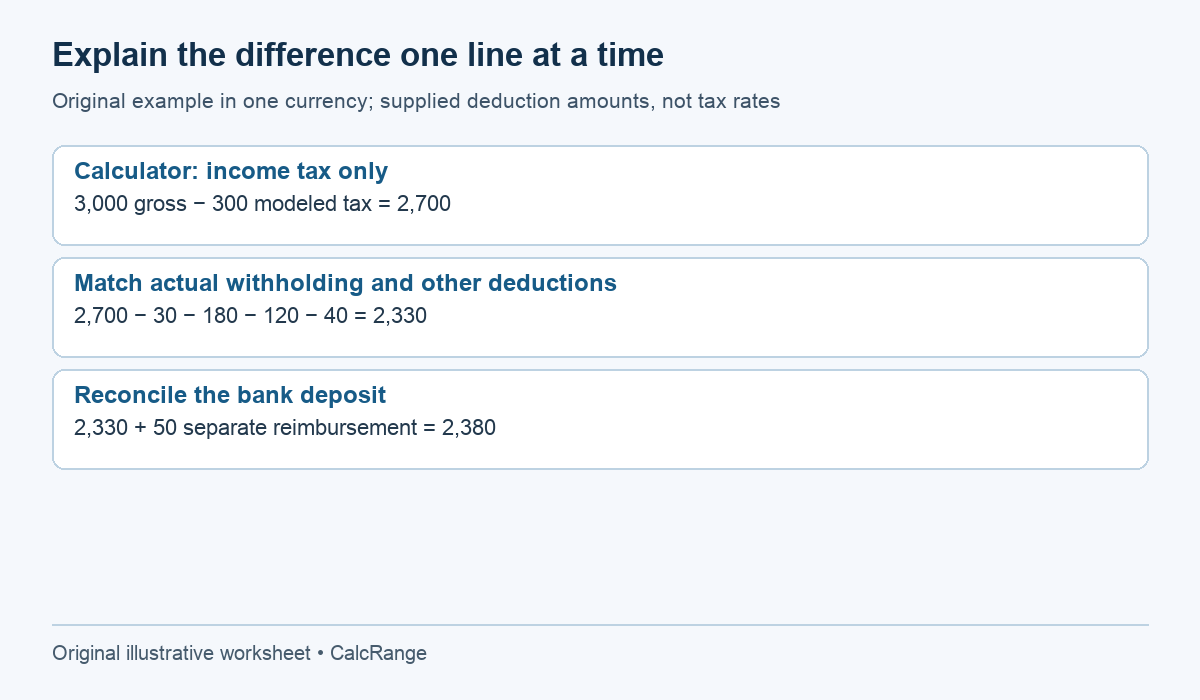
Table of Contents
1. Match the same pay period
Write the payslip’s start date, end date and payment date. Check whether the displayed earnings and deductions are for this period or year to date. A year-to-date tax total cannot be subtracted from one month’s gross salary to find that month’s net pay.
Monthly, semi-monthly and biweekly also differ. Twelve monthly payments, 24 semi-monthly payments and ordinarily 26 biweekly payments are different annual schedules. A year can have payroll-calendar exceptions, so use the actual employer schedule rather than silently assuming every month contains exactly four weeks.
For UK employees, GOV.UK’s payslip guidance describes gross and net earnings, variable deductions and hours when pay depends on time worked. Other jurisdictions have their own requirements. The reconciliation method below uses fictional amounts and does not claim that any particular deduction is legally due.
2. Match the gross earnings before comparing deductions
Suppose a regular monthly gross salary is 3,000 currency units. Check whether the actual payslip also includes overtime, a bonus, unpaid absence, a correction or taxable benefits. If its gross line is 3,250, a calculator run using 3,000 begins 250 away before tax is considered.
Use the same currency and pay frequency. The current calculator’s holiday/vacation adjustment can also change the modeled earnings. Record whether you are viewing its adjusted or unadjusted column. For a fixed salary already stated as the actual monthly payment, do not subtract paid leave as though it were unpaid time.
Do not force an unknown pension or benefit into the gross-pay field just to make the result match. Some items change taxable pay, some change cash deductions and some appear only as informational employer contributions. Read the payslip labels or ask payroll which category applies.
3. Build a bridge from the estimate to the actual net amount
Assume the calculator shows gross pay of 3,000, modeled income tax of 300 and a result of 2,700 after that tax. The fictional payslip instead shows income-tax withholding of 330, social contributions of 180, employee pension deductions of 120 and a loan repayment of 40.
| Step | Adjustment | Running amount |
|---|---|---|
| Calculator result after modeled tax | 3,000 − 300 | 2,700 |
| Extra tax actually withheld | −(330 − 300) | 2,670 |
| Social contribution on payslip | −180 | 2,490 |
| Employee pension deduction | −120 | 2,370 |
| Loan repayment | −40 | 2,330 |
| Separate reimbursement paid with wages | +50 | 2,380 deposit |
The payslip net before that separately assumed reimbursement is 3,000 − 330 − 180 − 120 − 40 = 2,330. If 50 is added outside the wage calculation and paid in the same transfer, the bank deposit is 2,380. The example treats that reimbursement as a separate cash item solely to illustrate reconciliation; its actual tax treatment depends on the applicable rules.
The gap between the calculator’s 2,700 and the 2,380 deposit is 320. It consists of 30 extra withholding + 180 + 120 + 40 − 50. This explains the difference without pretending that one hidden “tax rate” caused all of it.
4. Investigate withholding without confusing it with all deductions
If you want to reproduce the fictional income-tax line alone, 330 ÷ 3,000 × 100 = 11%. A known effective-rate override of 11% would model 2,670 after income tax, before the other lines. It would not prove that 11% is the correct statutory rate for the employee.
Do not instead enter 20.6667% just because (3,000 − 2,380) ÷ 3,000 gives that approximate percentage. That would fold pensions, contributions, a loan and a reimbursement into a misleading label of “income tax.” It might match one deposit while failing the next month.
Taxable pay and cash gross pay can differ, and withholding can depend on cumulative earnings, tax codes, credits and adjustments. In the UK, HMRC’s payslip-tax check directs workers to review the information used for their tax. Use the relevant authority’s process for your jurisdiction rather than treating a generic calculator discrepancy as proof of an employer error.
The current CalcRange UK model has a stated 2026/27 scope; other country and state/province selections are illustrative. Check the tool’s assumptions before using its tax number. For the conceptual distinction, see withholding versus final tax liability.
5. Reconcile the deposit, then explain any remainder
Compare the final modeled cash amount with the bank transfer. If there are multiple deposits, add the relevant ones once. If wages are split between two accounts, looking at only one account produces an artificial shortfall.
Round at the same stage as the source document where possible. A few cents may result from item-level rounding; a persistent large amount deserves a named ledger line. Do not dismiss a 100-unit difference as “rounding” when every displayed component is already given to two decimal places.
Keep employer-paid contributions separate from employee deductions. An employer pension contribution may appear on the statement without reducing the cash deposit. Subtracting every number visible on a payslip is therefore not a reliable method.
Three discrepancies that need their own line
A bonus changes gross pay before it changes deductions
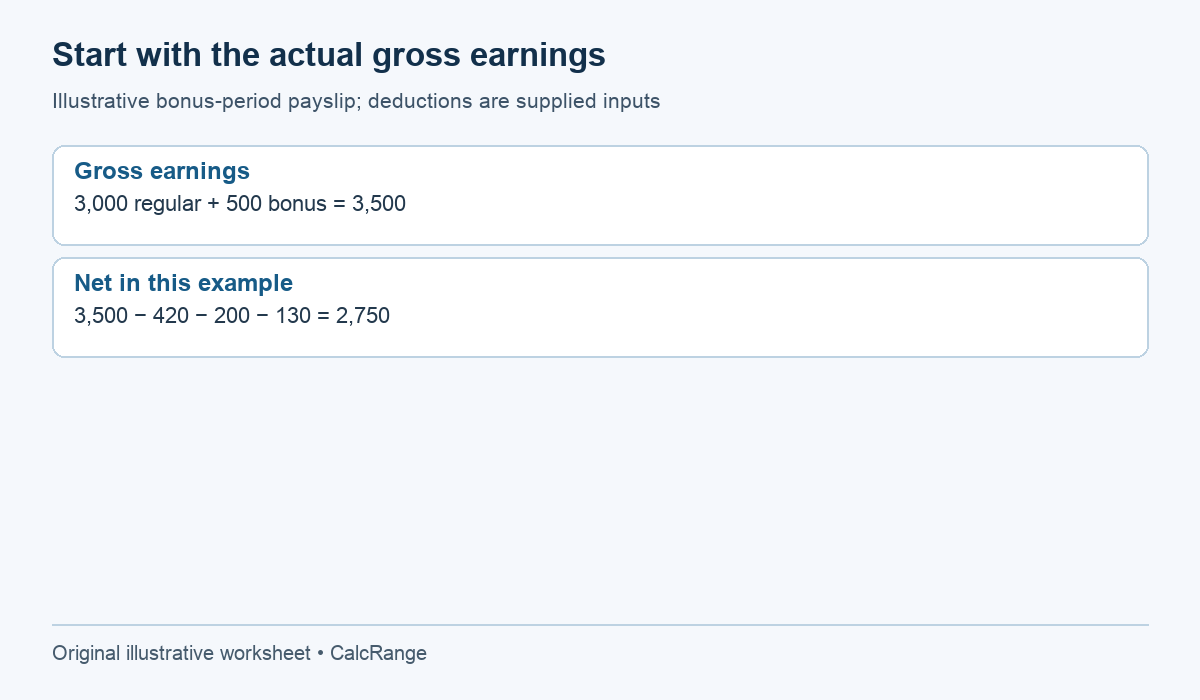
Suppose the usual gross pay is 3,000, but a payslip includes a 500 bonus and therefore shows 3,500 gross. A calculator run still using 3,000 cannot be reconciled merely by searching for a different tax percentage. The first bridge entry is the extra 500 of earnings.
If the actual payslip then shows 420 income-tax withholding, 200 social contributions and 130 pension deduction, its net is 3,500 − 420 − 200 − 130 = 2,750. Those supplied values are an original ledger example, not calculated statutory deductions. The bonus may have a particular tax or contribution treatment that the generic calculator does not model.
Compare the earnings components with the employer’s record first, then compare deductions. If a bonus is paid separately, combine only the statements and deposits that belong to the intended reconciliation. Mixing a regular payslip with a separate bonus bank transfer without the matching statement creates another unexplained gap.
Year-to-date figures can check one period, but are not that period
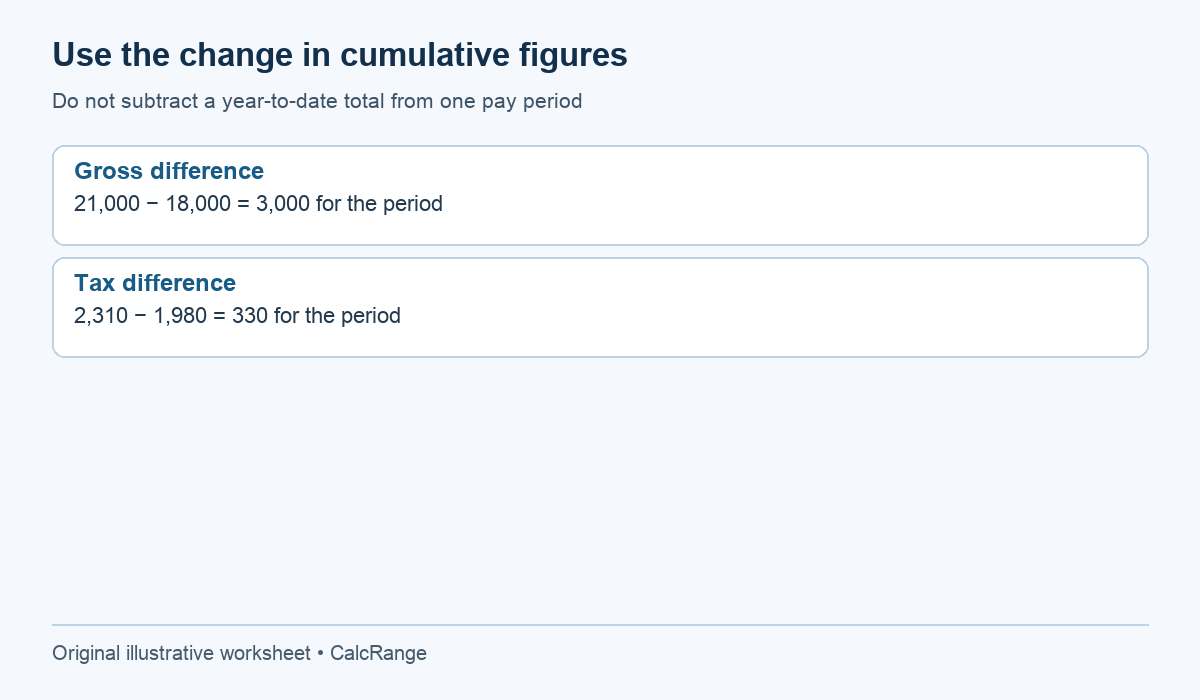
Imagine year-to-date gross rises from 18,000 on one statement to 21,000 on the next. The difference is 3,000, matching a regular period’s earnings. If year-to-date income tax rises from 1,980 to 2,310, the difference is 330. These differences provide independent checks of the period’s displayed lines.
Do not subtract the full 2,310 tax total from the single 3,000 gross payment. The result of 690 would combine different time scopes. Instead, use either all current-period figures or a complete year-to-date reconciliation. Label the scope prominently on the worksheet.
A year-to-date difference may also include corrections or a restarted payroll record, so investigate any mismatch. The arithmetic identifies where records disagree; it does not establish why. Ask payroll whether a prior-period adjustment, transfer or tax-year reset changed the cumulative values.
A split deposit should reconcile to the same cash total
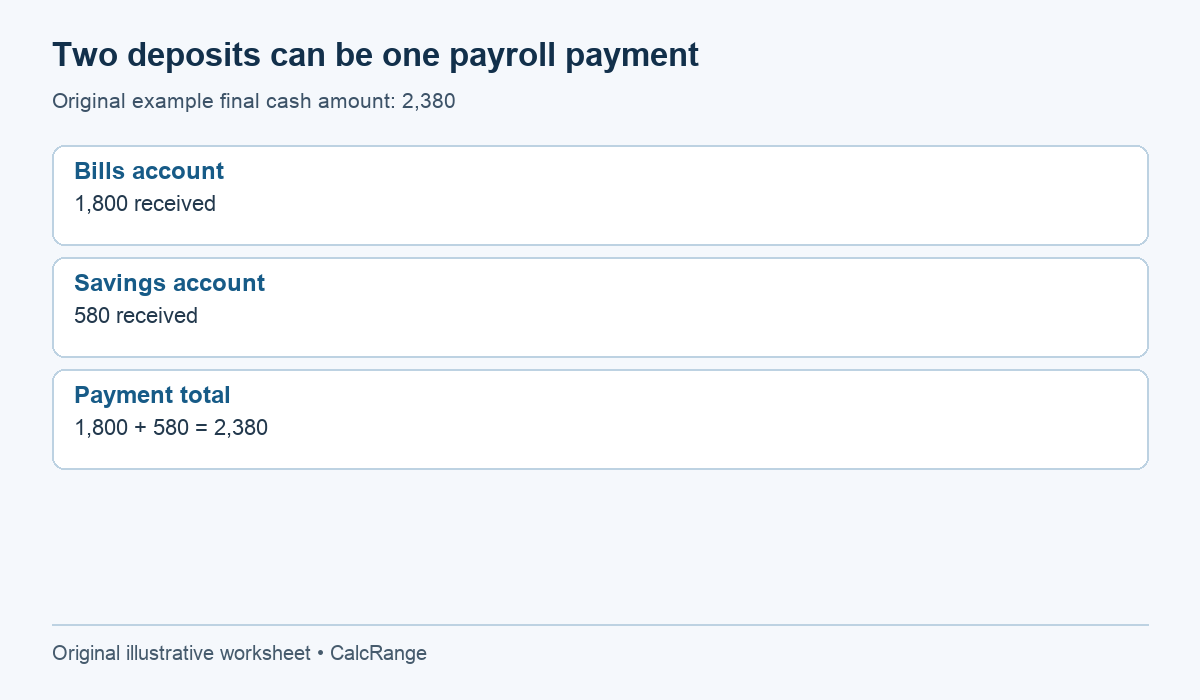
Return to the original example’s 2,380 final cash payment. If 1,800 is deposited into a bills account and 580 into a savings account, the sum still equals 2,380. Comparing the calculator only with the 1,800 deposit would incorrectly add a further 580 discrepancy.
Record each destination as a payment allocation, not another deduction from pay. The employee still receives the savings-account amount even if it is not available in the main spending account. The same distinction applies to money routed directly to a separate account by agreement.
Before contacting payroll, check the payment date and pending transactions. A transfer visible one day later may be a timing issue, while a different amount may require investigation. Do not invent a pending credit to force the ledger to balance: mark it as unresolved until the actual payment or explanation is available.
A complete reconciliation ends with zero unexplained difference, or with a named unresolved item supported by a question. It should not end with a generic “other tax” line added solely to absorb whatever number remains.
Turn the remaining difference into a useful payroll question
Save the calculator inputs, selected model, result column and date, plus the payslip period. Then write a specific question: “Gross earnings match at 3,000; I can reconcile contributions and pension, but actual tax is 30 higher than this estimate. Which tax code or cumulative adjustment explains it?”
Redact account numbers and unnecessary personal details if sharing a worksheet. You can retain the arithmetic without copying the entire payslip. Our payslip deduction guide helps identify common labels; gross versus net pay explains the broader relationship. Neither substitutes for the employer’s records or an authoritative tax calculation.