Date Difference Calculator – Free 2026

How to Use a Date Difference Calculator

Whether you are counting down the days to a long-awaited vacation, managing a complex corporate project, or simply trying to figure out exactly how old you are in days, tracking time is a fundamental part of human existence. We constantly navigate schedules, deadlines, and milestones. However, because our calendar system is uniquely complex, figuring out the exact time between two points is rarely as simple as basic subtraction.

Trying to conceive? Once you’ve found your fertile window, use our Pregnancy Due Date Calculator to estimate your baby’s arrival date.
For a healthy journey, also try our BMI Calculator, Calorie Calculator, and Ideal Weight Calculator.

Date Difference Calculator

Find the exact time between two dates in years, months and days — plus total days, weeks and hours — or add and subtract days, weeks, months and years from any date.

📅 Duration➕ Add / subtract📊 Total days & weeks🗓️ Weekdays

Note: Calendar months vary in length, so the years/months/days breakdown and a plain “total days” figure are both shown. Dates use your local calendar; results exclude time-of-day.

This is where a Date Difference Calculator becomes an indispensable tool.

Date Difference Calculator: Instead of staring at a wall calendar and manually counting boxes, a digital date calculator automates the process, instantly providing accurate results. In this comprehensive guide, we will explore exactly how these tools work, practical applications for your personal and professional life, the complex math running behind the scenes, and how you can replicate these calculations using spreadsheets or even manual techniques.

date difference Calculator

What is a Date Difference Calculator?

At its core, a Date Difference Calculator is a digital utility designed to compute the exact span of time between a designated start date and an end date. While the concept sounds incredibly simple, the execution involves complex algorithms that account for varying month lengths, leap years, and specific user parameters.

When you need to find the days between dates, this tool eliminates human error. You simply input Date A and Date B, and the calculator yields the results. Most advanced tools will not only give you the total day count but also break down the result into a combination of years, months, weeks, days, hours, and even seconds.

Core Functions of a Standard Date Calculator

  • Simple Subtraction: Finding the absolute number of days between two points in time.
  • Addition/Subtraction from a Date: Inputting a start date and adding (or subtracting) a specific number of days to find a future or past date.
  • Business Day Calculations: Filtering out weekends and public holidays to find true working days.
  • Age and Milestone Tracking: Determining exact ages or anniversaries.

Personal and Everyday Use Cases

Time tracking isn’t just for corporate project managers. An online date calculator has dozens of practical applications for everyday life, helping you plan, organize, and celebrate.

1. Milestone Tracking and Age Calculation

Have you ever wondered exactly how many days you have been alive? A common use for these tools is to calculate age from date of birth. While you know your age in years, a calculator can tell you that you are precisely 32 years, 4 months, and 16 days old—or roughly 11,825 days old. This is incredibly popular for celebrating unique milestones, such as a “10,000th day alive” party, which happens when a person is roughly 27 years and 4 months old.

2. Medical and Health Planning

In the medical field, exact date tracking is critical. One of the most common applications is pregnancy due date estimation. Obstetricians and expectant parents use date calculators to track the 280-day gestational period. By inputting the date of the last menstrual period (LMP), the calculator instantly projects the estimated due date (EDD), allowing parents to track exactly what week of pregnancy they are in.

3. Goal Setting and Countdown Planning

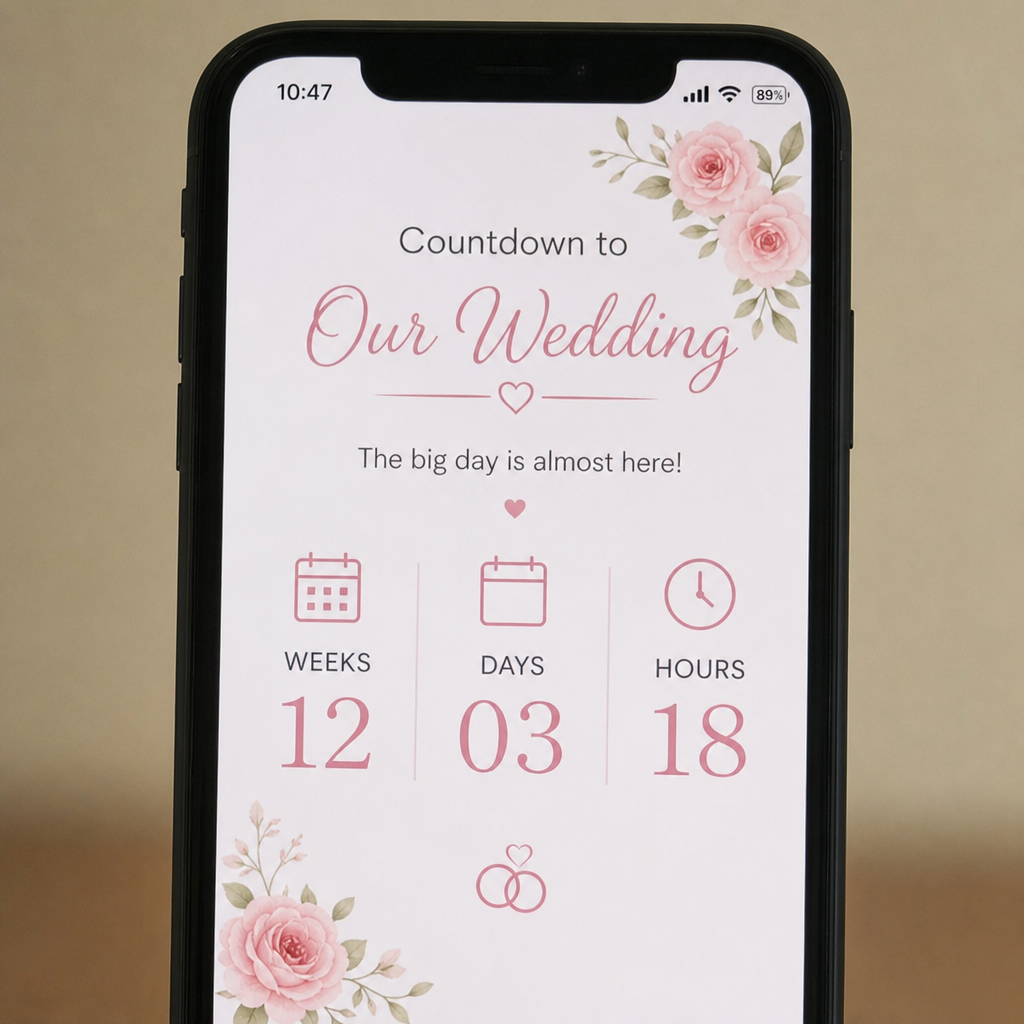
Date Difference Calculator: If you are planning a wedding, studying for a major exam, or preparing for a marathon, knowing exactly how many weeks remaining until a deadline is crucial for pacing your preparation. By understanding the exact time duration, you can break your large goals down into weekly, manageable micro-goals.

Date Difference Calculator

Business and Project Management Applications

In the corporate world, “time is money” is not just a cliché; it is the foundation of business operations, contracts, and logistics.

Navigating the Work Week

When negotiating contracts, establishing Service Level Agreements (SLAs), or planning software development sprints, counting total calendar days is insufficient. Businesses operate on workdays. Therefore, project managers rely heavily on a business day counter with holidays.

If a client requires a project completed in “30 business days,” you cannot simply add 30 days to the current date. You must exclude Saturdays and Sundays. Furthermore, you must exclude localized bank or federal holidays. A sophisticated calculator determines the exact number of working days between dates, ensuring teams do not accidentally overpromise delivery on a deadline that falls on Thanksgiving or Christmas.

Supply Chain and Logistics

In shipping and logistics, tracking the time duration between specific dates determines whether perishable goods will survive a journey or if a container ship will arrive before a port closes. Logistics managers use these calculators to map out routes, factoring in weekend delays and international holidays that might stall customs clearance.

The Technical Mechanics: How the Math Works

You might wonder why a computer is even necessary for this. Why can’t we just use basic math? The answer lies in the messy, historical construction of our modern calendar system.

The Complexities of the Gregorian Calendar with Date Difference Calculator

Almost the entire global business world operates on the Gregorian calendar. Introduced by Pope Gregory XIII in 1582, it was designed to fix the inaccuracies of the Julian calendar regarding the solar year. However, Gregorian calendar duration math is inherently irregular.

Months do not have a uniform number of days. They alternate between 30 and 31 days, with February stubbornly sitting at 28 days. Because the months are uneven, calculating the total months and years between dates requires complex algorithmic logic.

For example, if you jump from January 31st to exactly one month later, what is the date? February doesn’t have a 31st day. A sophisticated calculator has built-in logic to handle these month-end discrepancies, usually snapping the result to the last day of the subsequent month (February 28th or 29th).

Factoring in Leap Years with Date Difference Calculator

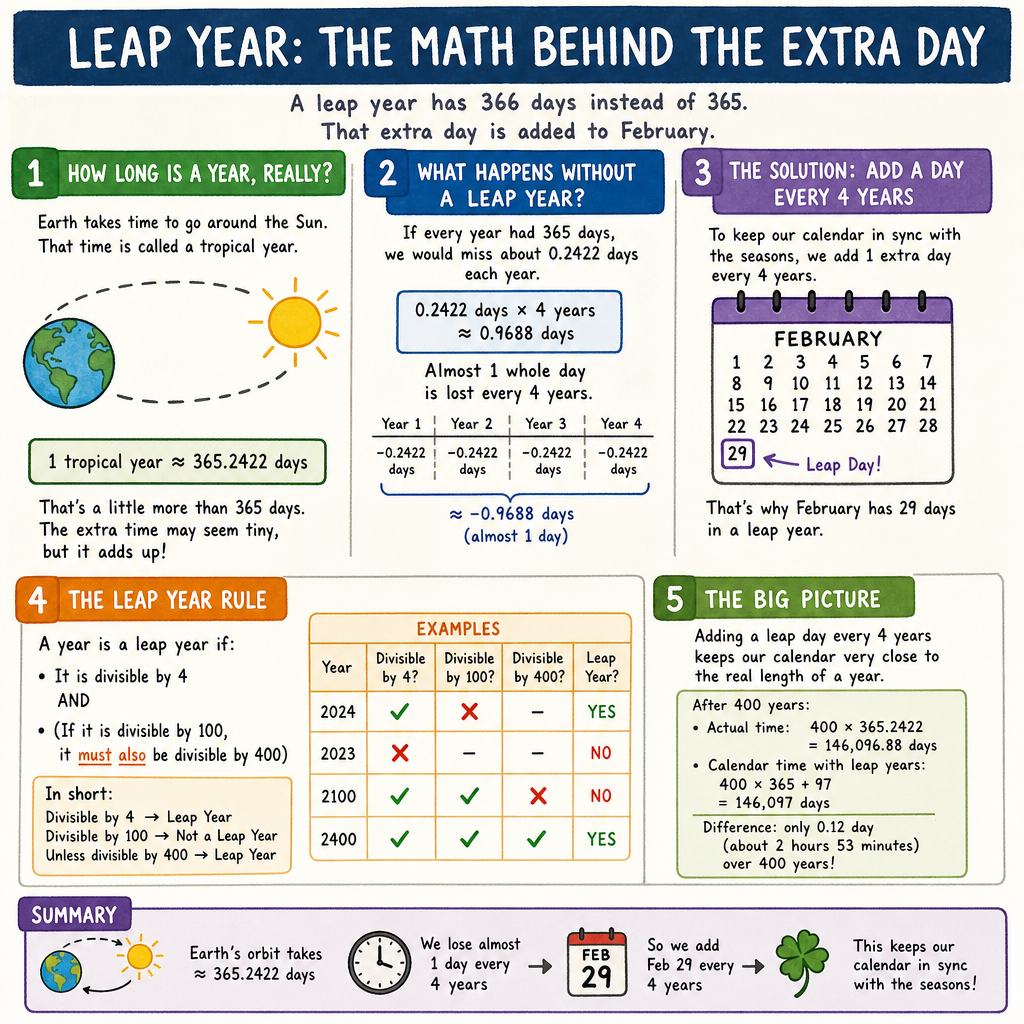
Date Difference Calculator: The Earth does not orbit the sun in exactly 365 days; it takes approximately 365.2422 days. To keep our calendar aligned with the seasons, we add an extra day to February every four years.

The leap year impact on date calculation is a frequent source of software bugs. A reliable Date Difference Calculator applies the precise leap year algorithm:

  1. If a year is evenly divisible by 4, it is a leap year.
  2. Except if it is divisible by 100, then it is NOT a leap year.
  3. Unless it is also divisible by 400, in which case it IS a leap year (which is why the year 2000 was a leap year, but 1900 was not).

When calculating large spans of time (like finding the days between January 1, 1950, and today), the calculator quietly runs this algorithm to add the exact number of February 29ths that occurred during that period.

A detailed graphic explaining the leap year math and how an extra day is added to February

The Boundary Problem: To Count or Not to Count?

Date Difference Calculator: One of the most confusing aspects of date math is the concept of inclusive versus exclusive day counting.

Imagine you are renting a hotel room from Friday to Sunday.

  • If you count inclusively (counting both the start and end days), that is 3 days (Friday, Saturday, Sunday).
  • If you count exclusively (measuring the midnight-to-midnight periods between the dates), it is 2 days.

Most date calculators default to exclusive counting (measuring the elapsed time). However, many legal contracts and HR vacation policies use inclusive counting. A high-quality calculator will feature a toggle box asking, “Include end date in calculation?” to ensure you get the exact metric you need.

Event Logic and Time Zones

Date Difference Calculator: If you have ever used an app that counts down to a specific moment, you have interacted with event countdown timer logic. These timers calculate the difference between the future target timestamp and the current system clock, refreshing the calculation every single second.

However, things get complicated across borders. Time zone adjustments for date tracking are vital for international teams. A deadline set for “Midnight on October 31st in Tokyo” occurs 13 hours before midnight on October 31st in New York. Advanced calculators use UTC (Coordinated Universal Time) as a baseline, converting local times to UTC, calculating the difference, and then translating the result back to local time to ensure accurate global tracking.

Manual Methods: Calculating Without a Computer

Date Difference Calculator: What if you find yourself without internet access and need to know how to calculate days between two dates on your own? Before computers, humans used clever manual tricks to keep track of time.

The Knuckle Method for Month Lengths

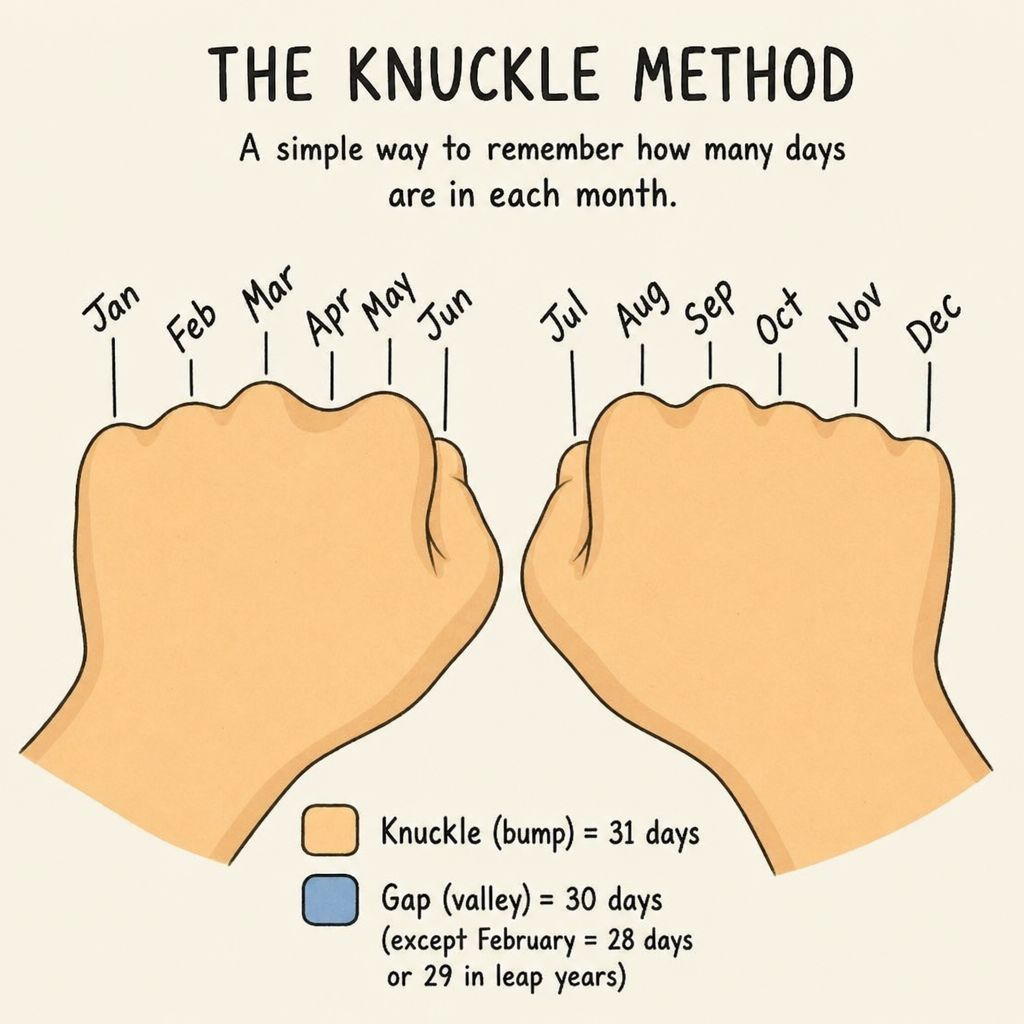
To do any manual calendar math, you must first know how many days are in each month. The traditional “knuckle method” is a universally taught manual method for counting days. Make a fist. Count your knuckles and the valleys between them, starting from the index finger knuckle:

  • 1st Knuckle: January (31 days)
  • 1st Valley: February (28/29 days)
  • 2nd Knuckle: March (31 days)
  • 2nd Valley: April (30 days) …and so on. Every knuckle represents a 31-day month, and every valley represents a 30-day month (or February).

Step-by-Step Manual Calculation

If you want to manually find the days between March 15th and August 10th of the same year, follow this process:

  1. Calculate the remaining days in the start month: March has 31 days. 31 – 15 = 16 days remaining in March.
  2. Add the full intermediate months:
    • April (30)
    • May (31)
    • June (30)
    • July (31)
    • Total intermediate days = 122
  3. Add the days in the end month: You want to reach August 10th, so add 10 days.
  4. Sum it up: 16 + 122 + 10 = 148 days.

While highly effective for short durations within the same year, this manual method becomes painfully tedious and error-prone when spanning across multiple years and leap cycles.

Date Difference Calculator

Mastering Date Calculations in Spreadsheets

Date Difference Calculator: For professionals who handle large datasets, using a web-based calculator for one date at a time is inefficient. Instead, they turn to software like Microsoft Excel or Google Sheets. Learning excel formulas for date subtraction is a required skill for modern data analysts and project managers.

Excel stores dates as sequential serial numbers. By default, January 1, 1900, is serial number 1. January 2, 1900, is number 2, and so on. Because of this, you can perform standard mathematical operations on dates.

Basic Subtraction

To find the total elapsed days between two dates in Excel, you simply subtract the older date from the newer date.

  • If A1 contains the start date (e.g., 01/01/2024)
  • And B1 contains the end date (e.g., 01/15/2024)
  • Formula: =B1-A1
  • Result: 14

The Hidden DATEDIF Function

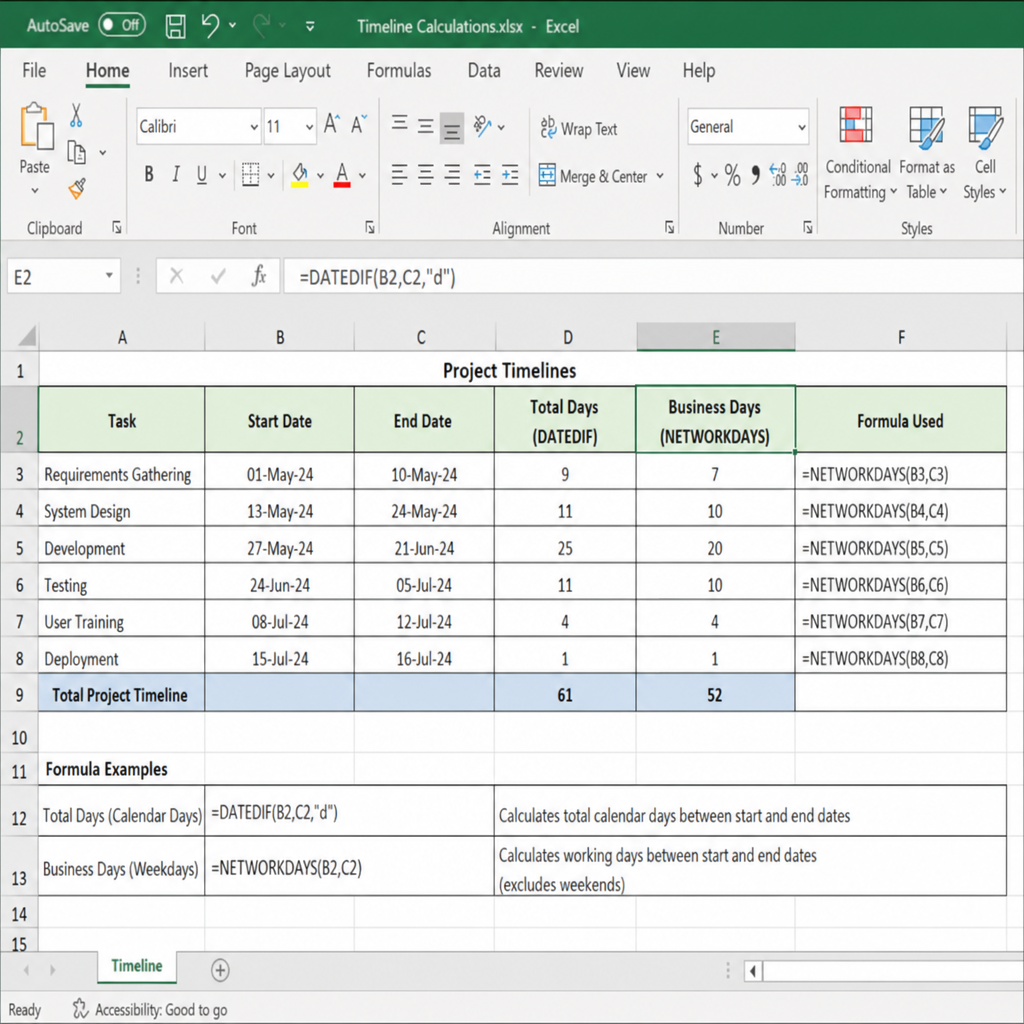
To calculate the total months and years between dates, Excel has a powerful, albeit slightly hidden, function called DATEDIF (Date Difference). Microsoft keeps it around for backward compatibility with Lotus 1-2-3, but it doesn’t always show up in the formula autocomplete menu.

The syntax is: =DATEDIF(start_date, end_date, “unit”)

The “unit” dictates how the result is displayed:

  • “Y” – Returns the number of complete years.
  • “M” – Returns the number of complete months.
  • “D” – Returns the number of days.
  • “YM” – Returns the remaining months after complete years are subtracted.
  • “MD” – Returns the remaining days after complete months and years are subtracted.

Example: To find someone’s exact age in years, months, and days based on their birthdate in cell A1 and today’s date in B1, you would combine formulas: =DATEDIF(A1, B1, “Y”) & ” Years, ” & DATEDIF(A1, B1, “YM”) & ” Months, ” & DATEDIF(A1, B1, “MD”) & ” Days”

Calculating Working Days (NETWORKDAYS)

When you need a business day counter with holidays inside a spreadsheet, the NETWORKDAYS function is your best friend.

The syntax is: =NETWORKDAYS(start_date, end_date, [holidays])

This formula automatically excludes Saturdays and Sundays. If you have a list of corporate or federal holidays in a separate range of cells (e.g., D1:D10), you can select that range for the [holidays] argument, and Excel will filter those out as well.

For regions (like the Middle East) where the weekend falls on Friday and Saturday, you can use =NETWORKDAYS.INTL, which allows you to customize exactly which days of the week are considered the weekend.

Screenshot showing an Excel spreadsheet with the DATEDIF and NETWORKDAYS formulas being used to calculate timelines

Step-by-Step: Getting the Most Out of Online Calculators

If you prefer using a web-based Date Difference Calculator rather than building spreadsheet formulas, maximizing the tool requires understanding its various settings. Here is a step-by-step guide to using these tools flawlessly.

Step 1: Input Your Dates Accurately

Ensure you are using the correct date format (MM/DD/YYYY vs. DD/MM/YYYY). Many international users make the mistake of inputting “04/05/2024” intending for it to mean May 4th, but a US-based calculator will read it as April 5th. Use calendar drop-down widgets to select the date visually to avoid this error.

Step 2: Determine Your Counting Logic

Refer back to the concept of inclusive versus exclusive day counting. Look for a checkbox that says “Include end date” or “Count first day.”

  • Check the box if you are calculating billing days, legal tenancy, or event durations.
  • Leave it unchecked if you are simply counting how many days are left until an event.

Step 3: Apply Business Filters

If you are calculating a work deadline, look for the “Business Days Only” toggle. Make sure the calculator allows you to specify your country, as public holidays vary wildly. A holiday in Canada (like Thanksgiving in October) does not apply to a team working in the United States.

Step 4: Analyze the Output

A robust Date Difference Calculator will give you alternative time units. It won’t just say “45 days.” It will provide a breakdown:

  • 1 month and 14 days
  • 6 weeks and 3 days
  • 1,080 hours
  • 64,800 minutes

This detailed breakdown is excellent for translating timelines into formats that resonate with different stakeholders. A marketing team might want to know they have “6 weeks” to launch, while an hourly freelancer might want to know the total “hours” in that span.

Troubleshooting Common Date Calculation Errors

Even with the best tools, users sometimes end up with results that don’t match their expectations. Here are the most common pitfalls and how to avoid them.

1. The “Off-By-One” Error

In programming and mathematics, the “off-by-one” error is notoriously common with dates. This usually happens when users confuse duration with calendar days. If you are starting a diet on Monday and ending on Friday, is that 4 days or 5? The duration is 4 days (Monday to Tuesday, Tuesday to Wed, etc.), but there are 5 calendar days involved. Always clarify what exact metric you are trying to find.

2. Time Zone Creep

If you are using a calculator that factors in current time (e.g., “Days from today”), remember that “today” changes at midnight. If you are in California and it is 10:00 PM on Tuesday, but the web server hosting the calculator is in New York (where it is 1:00 AM on Wednesday), the calculator might give you an answer that is one day short. To prevent this, manually input both the start and end dates rather than relying on a “today” button.

3. Historical Calendar Changes

If you are doing genealogical research or calculating dates from centuries ago, be aware that the Gregorian calendar was adopted at different times by different countries. Great Britain and its colonies (including what is now the US) didn’t adopt it until 1752. Before that, they used the Julian calendar. Calculating the exact days between a date in 1700 and today requires a specialized historical date calculator that accounts for the 11 days that were famously “skipped” in September 1752 to realign the calendar.

Conclusion

Time is the one resource we cannot manufacture more of, making its accurate measurement absolutely vital. Whether you are using a web-based Date Difference Calculator to find out how many weeks remaining until a deadline, leveraging Excel functions to track the number of working days between dates for a major corporate launch, or estimating a joyous life event like a pregnancy due date estimation, these tools bring clarity to an otherwise confusing calendar system.

Understanding the underlying mechanics—from leap year impact on date calculation to the nuances of inclusive versus exclusive day counting—empowers you to use these tools more effectively. The next time you find yourself staring at a calendar trying to manually trace your finger across the weeks, save yourself the time and potential errors. Let the algorithms do the heavy lifting, ensuring you always know exactly where you stand in time.

Date Difference Calculator — Frequently Asked Questions

1. What is a date difference calculator?
It works out the exact time between two dates, shown as years, months and days, plus totals in days, weeks, months, hours and minutes. It can also add or subtract time from a date.
2. How do I calculate the days between two dates?
Enter a start date and an end date and press calculate. The tool returns the total number of days as well as a years-months-days breakdown.
3. Does it include or exclude the end day?
By default the end day isn’t counted. Tick “include the end day” to add one day to the total, which is handy for counting inclusive ranges.
4. How do I add days to a date?
Use the add/subtract tab, pick your start date, choose Add, enter the number of days, and the calculator shows the resulting date and its weekday.
5. How do I subtract days, weeks or months from a date?
Choose Subtract in the add/subtract tab and pick the unit — days, weeks, months or years. The new earlier date is shown instantly.
6. Why are years, months and days shown separately from total days?
Because months differ in length, “2 months” isn’t a fixed number of days. The breakdown gives a calendar-accurate gap, while total days gives an exact count.
7. Can I find how many weeks are between two dates?
Yes — the totals show the number of whole weeks plus any leftover days, calculated from the total day count.
8. Does it tell me the day of the week?
Yes. The difference results show the weekday of each date, and the add/subtract tab shows the weekday of the resulting date.
9. What if my end date is before my start date?
The calculator automatically swaps them so the result is always positive, and notes that it did so.
10. How do I calculate my age in days?
Enter your date of birth as the start date and today as the end date. The total days figure is your age in days.
11. Does it account for leap years?
Yes. The calculation uses the real calendar, so leap days on 29 February are included automatically in the totals.
12. How is adding a month handled at month-end?
If the start day doesn’t exist in the target month — like 31 January plus one month — the result is clamped to the last valid day, here 28 or 29 February.
13. Can I work out a project deadline?
Yes. Put your start date in the add/subtract tab, add the project length in days or weeks, and read off the deadline date and weekday.
14. Does it count business or working days?
This calculator counts calendar days, including weekends and holidays. For working-day counts you’d subtract weekends and any public holidays separately.
15. Can I calculate hours or minutes between dates?
Yes, the totals include the difference expressed in hours and minutes, derived from the day count.
16. What date format does it use?
You select dates from a calendar picker, so the format follows your device, and results are written out in full (for example, 1 January 2026).
17. Can I count down to a future event?
Yes — set today as the start and the event as the end to see how many days, weeks and months away it is. For a live ticking clock, use a countdown timer.
18. Is the time of day included?
No, this tool works with whole calendar dates and excludes the time of day, so results are in whole days and larger units.
19. Can I print or save my result?
Yes, use the print button to print the page or save it as a PDF, keeping a record of the dates and totals.
20. Is the date difference calculator free and accurate?
Yes, it is free and uses the real calendar including leap years, so results are accurate to the day for the dates you enter.

Disclaimer: These FAQs are for general guidance. The calculator counts calendar days including weekends and holidays and excludes the time of day.

Scroll to Top